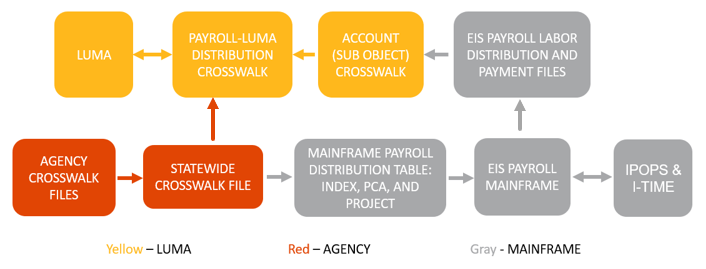
As the Luma Project team prepares for Phase 1 go-live of the Budget, Finance, and Procurement modules, it will be necessary to build a crosswalk between the state’s legacy payroll system into Luma to ensure a seamless transition for payroll. To facilitate this, each agency will build a Payroll-Luma Crosswalk providing a source for Index, PCA, and Project distribution codes. Agencies will maintain this crosswalk until Phase 2 implementation.
The data received in the Payroll-Luma Crosswalk will be imported into the EIS Mainframe Payroll system for payroll processing and into IPOPS and I-Time for distribution overrides on earnings and time entry. After payroll processes, interface files are created which will go back through an Account Crosswalk and the Payroll-Luma Crosswalk before importing into Luma to post to General Ledger and Accounts Payable.
| 
|
|
Expected Outcomes of Kick-off:
- Introduction to the concept of
setting up default values in Luma.
- Walk-through of how to set up
default values.
- Introduction to what payroll will
look like in the interim between Phase 1 and Phase 2 go-live.
- Explanation of the need to
maintain a Payroll crosswalk during the interim.
- Walk-through of how to complete
the Payroll crosswalk for your agency.
- Walk-through of how to setup PCN
defaults for your agency to mass update upon Phase 1 go-live.
Resource Library:
Meeting Presentation:  Default and Crosswalk Workbook Kickoff.pptx
Meeting Recording: https://youtu.be/jF34ZWjY-7I
Contacts:
Glenda Smith – gsmith@sco.Idaho.gov COA Defaults Workbook
Amber Brown – abrown@sco.Idaho.gov Payroll Crosswalk Workbook
*The Luma Finance Team is managing the COA Default workbooks, please do not contact the Division of Statewide Accounting with questions.
** The Luma Payroll team is managing the Payroll Crosswalk, please do not contact the Division of Statewide Payroll with questions.
Office Hours:
Join us for our Upcoming Office Hours: Every Thursday, starting November 19th and spanning until March 4th, from 11:00 AM - 12:00 PM
| When it's time, join your Webex meeting here. |